Regular verification of the incubation temperature helps ensure reliable Delvotest® test performance. This procedure explains how to verify the temperature accuracy of your Delvotest® MiniS using a calibrated thermometer and a flexible temperature probe. The measured temperature should correspond to the selected MiniS temperature within ±2 °C. If a reproducible temperature deviation is detected, the MiniS temperature set-point can be adjusted as described in the MiniS Operation Manual.
Before you start
For an accurate measurement:
- Perform the check in an environment with a stable temperature, preferably between 15 and 25 °C.
- Minimise wind, air draughts and excessive moisture during the measurement.
- Use a calibrated thermometer and a flexible temperature probe.The thermometer must be capable of verifying that the MiniS temperature remains within the required tolerance of ±2 °C from the selected incubation temperature.
- After the measurement, clean the probe tip and the MiniS measuring cavity thoroughly with a dry paper towel.
What you need
- A calibrated thermometer
- A flexible temperature probe
- Thermal silicone grease or thermal paste
- A timer
A Testo 925 thermometer with a flexible thermocouple probe of approximately 1.5 mm diameter is one suitable example.
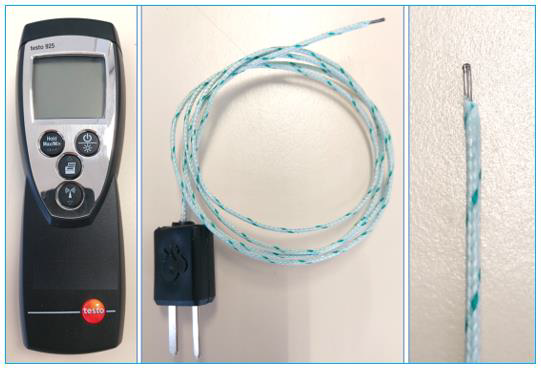
Temperature-check procedure
1. Warm up the MiniS
- Switch on the MiniS.
- Select Programme B, with a duration of 3 hours and 15 minutes.
- Allow the MiniS to warm up for at least 20 minutes.
- Confirm that the device has reached a stable temperature of 64 °C.
2. Prepare the temperature probe
Apply a thin, even coating of thermal silicone grease or thermal paste to the tip of the flexible probe.
Carefully dip the probe tip into the thermal grease or paste and then remove it. Check that the probe tip is completely covered.
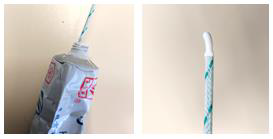
3. Position the probe
Carefully insert the probe tip into the small measuring cavity intended for the temperature check.
Make sure that:
- The probe reaches the bottom of the cavity.
- The probe is positioned at the centre of the MiniS metal heating block.
- The probe remains stable during the measurement.
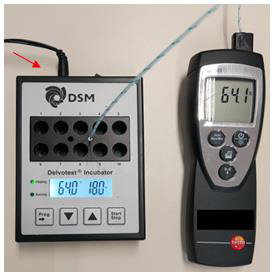
4. Record the temperature
Monitor the thermometer display. Allow approximately one minute for the reading to stabilise and then record the measured temperature.
The measured temperature should correspond to the MiniS set-point within ±2 °C.
5. After the check
Carefully remove the probe. Clean both the probe tip and the MiniS measuring cavity thoroughly with a dry paper towel to remove any remaining thermal grease or paste.
What to do if deviation is detected
If the measured temperature differs by more than ±2 °C from the selected MiniS temperature, follow the actions below before using the incubator for testing.
- Confirm that a calibrated thermometer was used and that the measurement was performed according to the procedure described above.
- Repeat the complete temperature verification to confirm that the measured deviation is reproducible.
- Record the measured deviation between the selected MiniS temperature and the actual temperature measured with the calibrated thermometer.
- If the deviation is confirmed, adjust the MiniS temperature set-point according to the instructions provided in the 🔗MiniS Operation Manual.
- After adjusting the set-point, repeat the temperature verification and confirm that the measured temperature is within ±2 °C of the selected temperature before using the incubator.
💬 Got any questions? Need help? Contact us at support@delvotest.com